From a song to a chart you'd play from
Everything Paradiddle does, click by click. New here? Read the quick start, then open a chart and press Help → Show me around for a one-minute tour of the page.
Quick start
- 1
Open the studio and drop in a song
Or paste a YouTube link. Your first song is free. The chart is ready in 3 to 6 minutes.
- 2
Press play
The cursor follows the recording, so you can read along and hear what's written.
- 3
Press Review fixes
It asks about the spots the model wasn't sure of, one key per answer, and copies a fixed bar to every bar played the same. Most songs take a few minutes.
- 4
Press Save, then Export
A PDF to print, MusicXML for notation apps, or MIDI for a DAW or an e-kit.
Get a chart
- 1
Go to the studio
Use Transcribe a song at the top of this site. You'll make an account first; no card is needed for your first song.
- 2
Under New transcription, choose Upload audio or YouTube link
Upload audio: drop a file on the box, or click it to choose one. mp3, wav, m4a and flac all work; any song with drums.
YouTube link: paste the video's address. Some videos can't be fetched; if that happens, upload the file instead.
- 3
Press Transcribe
Paradiddle separates the drums from the rest of the song, listens for every hit, places the notes on the staff and engraves the chart. It takes 3 to 6 minutes. You can leave the page; the chart will be waiting under Your charts.
- 4
Open it from Your charts
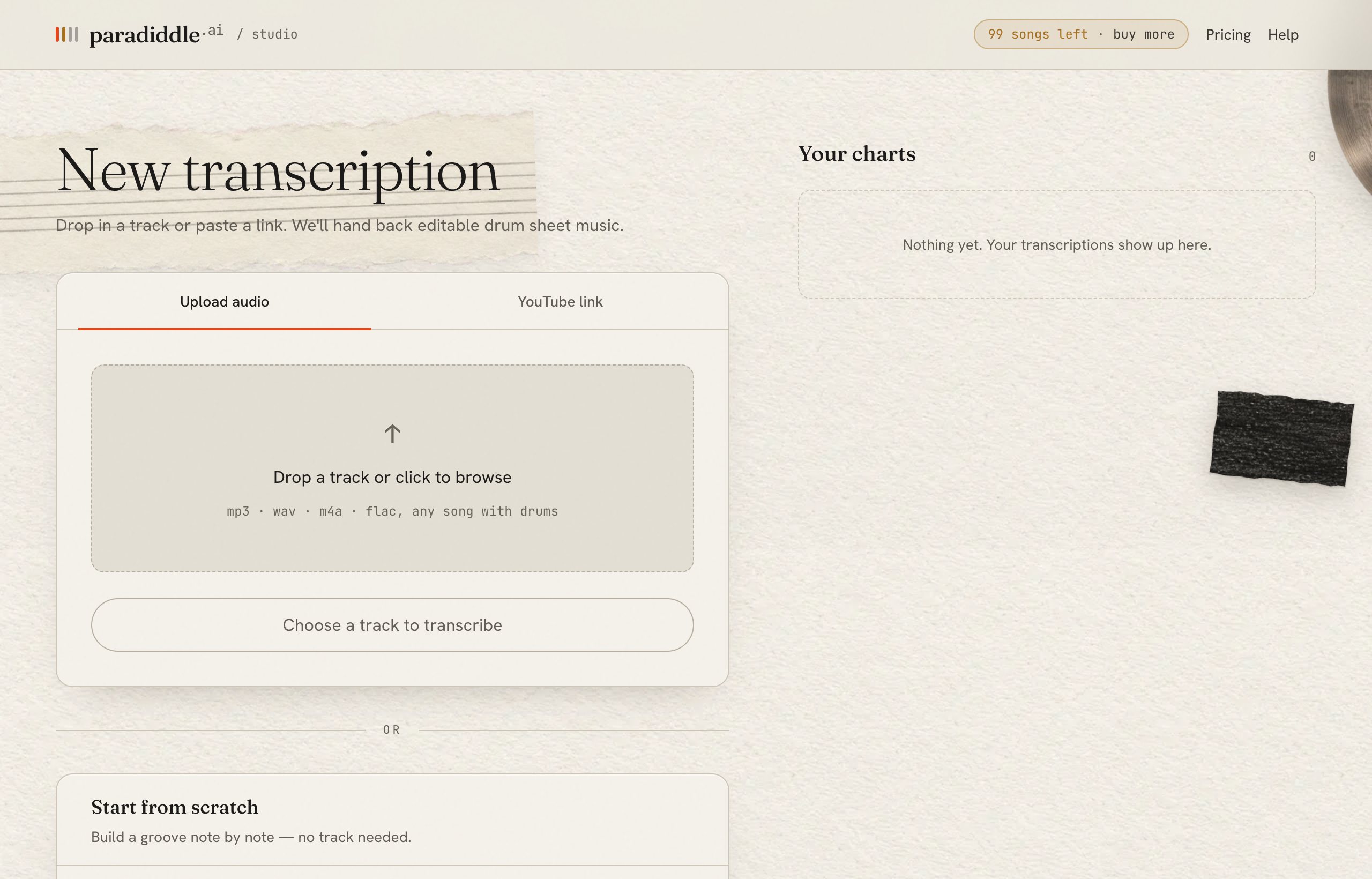
Start from scratch makes an empty chart with no recording: give it a title, a tempo, beats per bar and a number of bars, then Create blank chart. Write the groove with the keyboard or by describing it.
Transcribe music you have the right to use, for your own practice. Your songs are private to your account.
Read the chart
Standard drum notation on a five-line staff, one drum per line or space. The tempo is at the top, and the bar number starts each line.
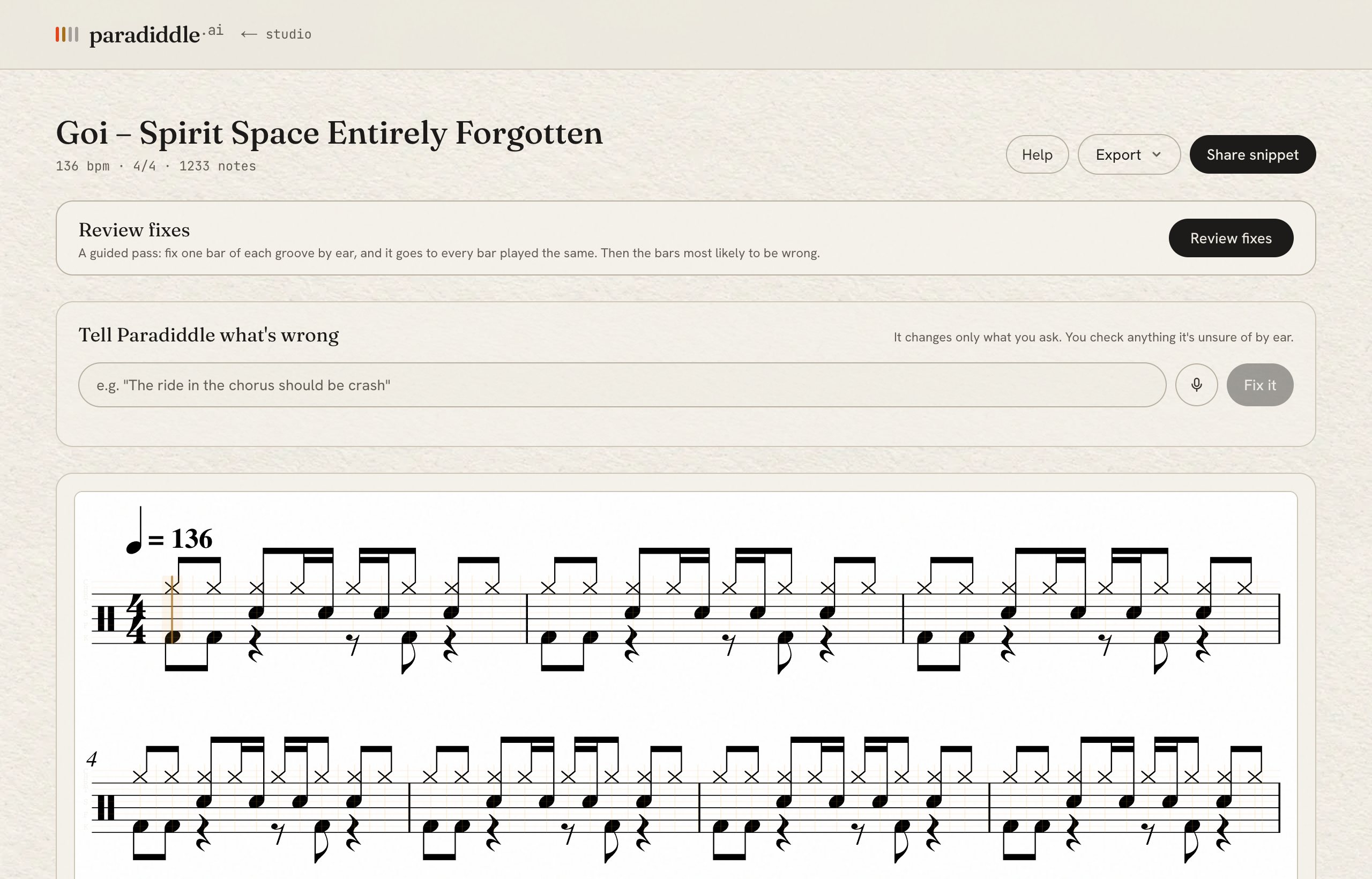
Notes the model wasn't sure about are flagged. ⚑ N to check at the top lists them; Tab jumps to the next one.
Play along
The player sits at the bottom of the score. The cursor follows the recording, so you always know where you are.

- ▶ Play / pause, or Space. While it plays, clicking the score jumps there.
- ⟲ replays from the start of the loop (0).
- mix / drums: the whole song, or the drums alone.
- − 100% +: the speed. Slow down to learn a fill (− and +).
- Loop: drag across the staff to pin a section; the loop button (L) turns looping on and off.
- Metronome (M) and a one-bar count-in (I).
- Full screen for a music-stand view, and − 100% + on the score to zoom.
Review fixes
A guided pass from the model's chart to yours. Songs repeat themselves, so you fix one bar of each groove by ear and the fix goes to every bar played the same. Then it takes you to the bars most likely to be wrong.
- 1
Press Review fixes, then Start
A panel opens under the score and loops the first bar at half speed on the drums alone. Change that at the top right: Drums / Full mix, and 100% 75% 50% 35% (or − and =).
- 2
Answer the questions
In each bar it first asks about the few spots the model wasn't sure of, looping just that moment: Hi-hat or ride?, Is there a crash here?, or for snare and toms, Which drums are hit here?
Press the drum's key: K kick, S snare, H hi-hat, T rack tom, F floor tom, C crash, R ride. X means nothing is there, Enter means it's right as written. A plays it again, Tab skips, Esc stops asking.
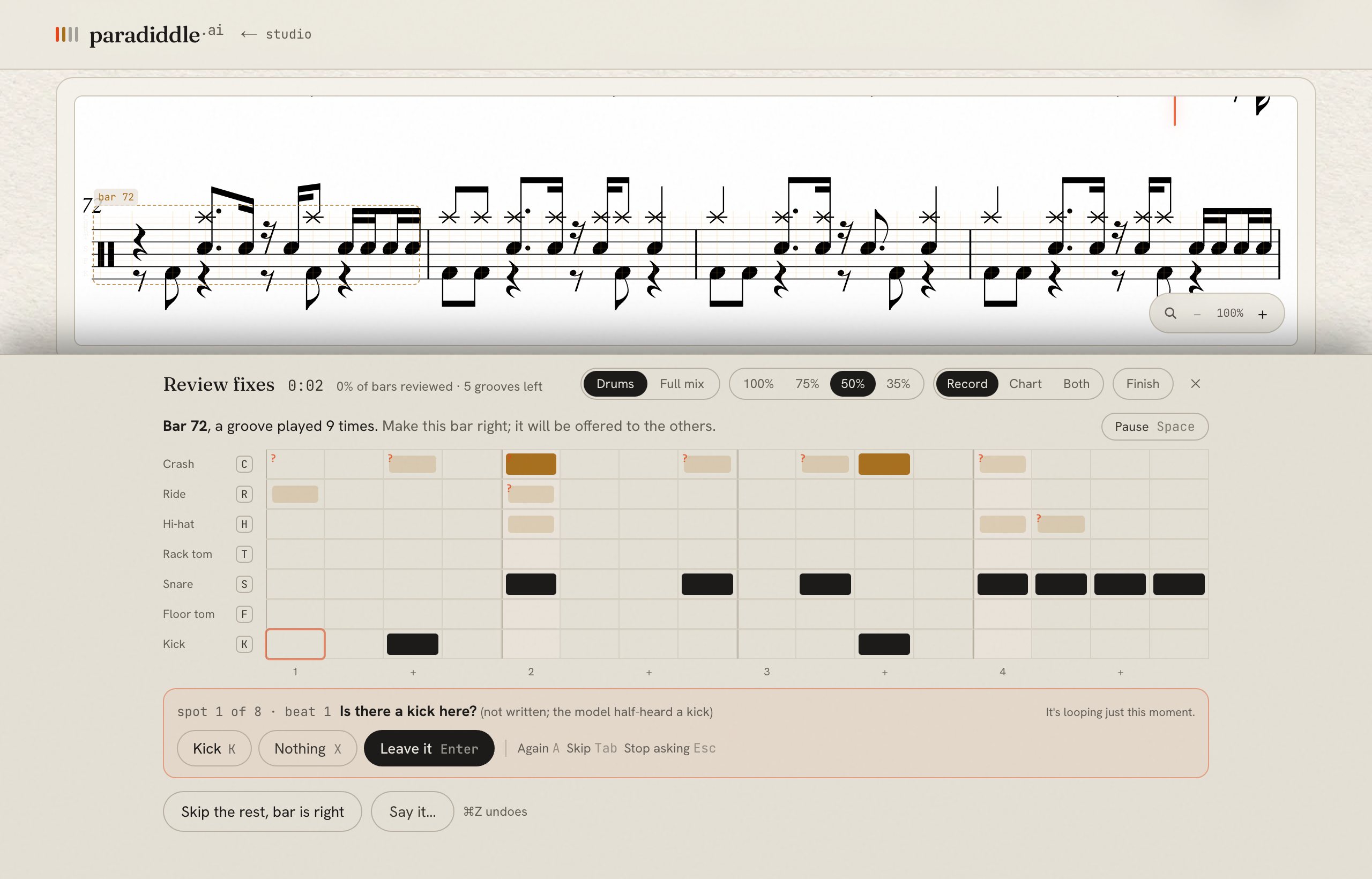
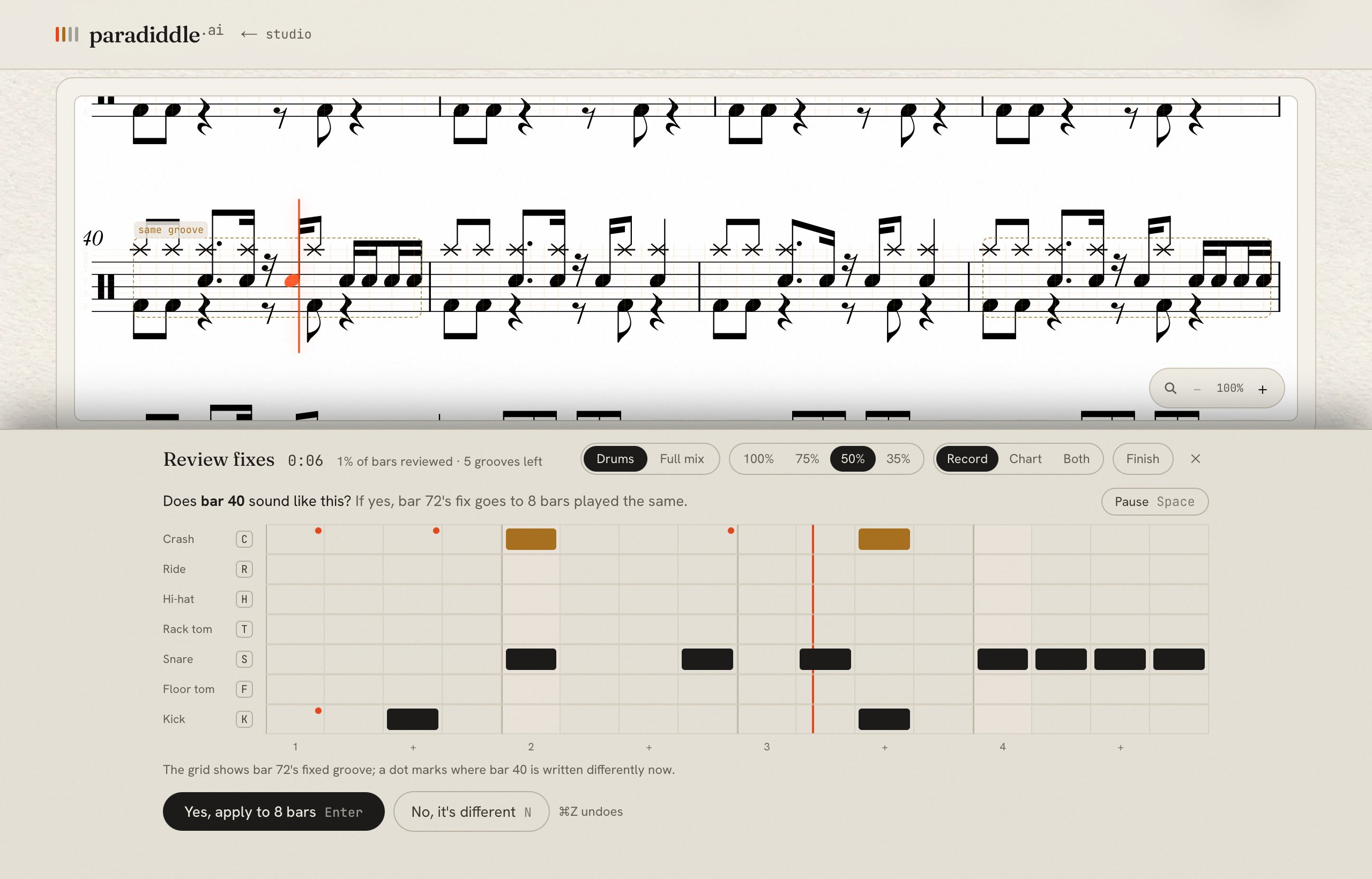
The ringed cell is the spot being asked about. A dot marks anything that differs from what the model wrote. - 3
Fix anything else in the grid
The grid is the bar: one row per drum, one column per sixteenth.
- Click a cell to add or remove one hit.
- Click a drum's name for the whole row: It's really… moves it to another drum, Play it on every… fills quarters, 8ths or 16ths, and Clear empties it.
- Play it on your keys while it loops. One or two taps add hits; three or more on one drum replace that row when the bar comes round.
- Say it… to describe the bar: “crash on 1, ride 8ths, no hats”.
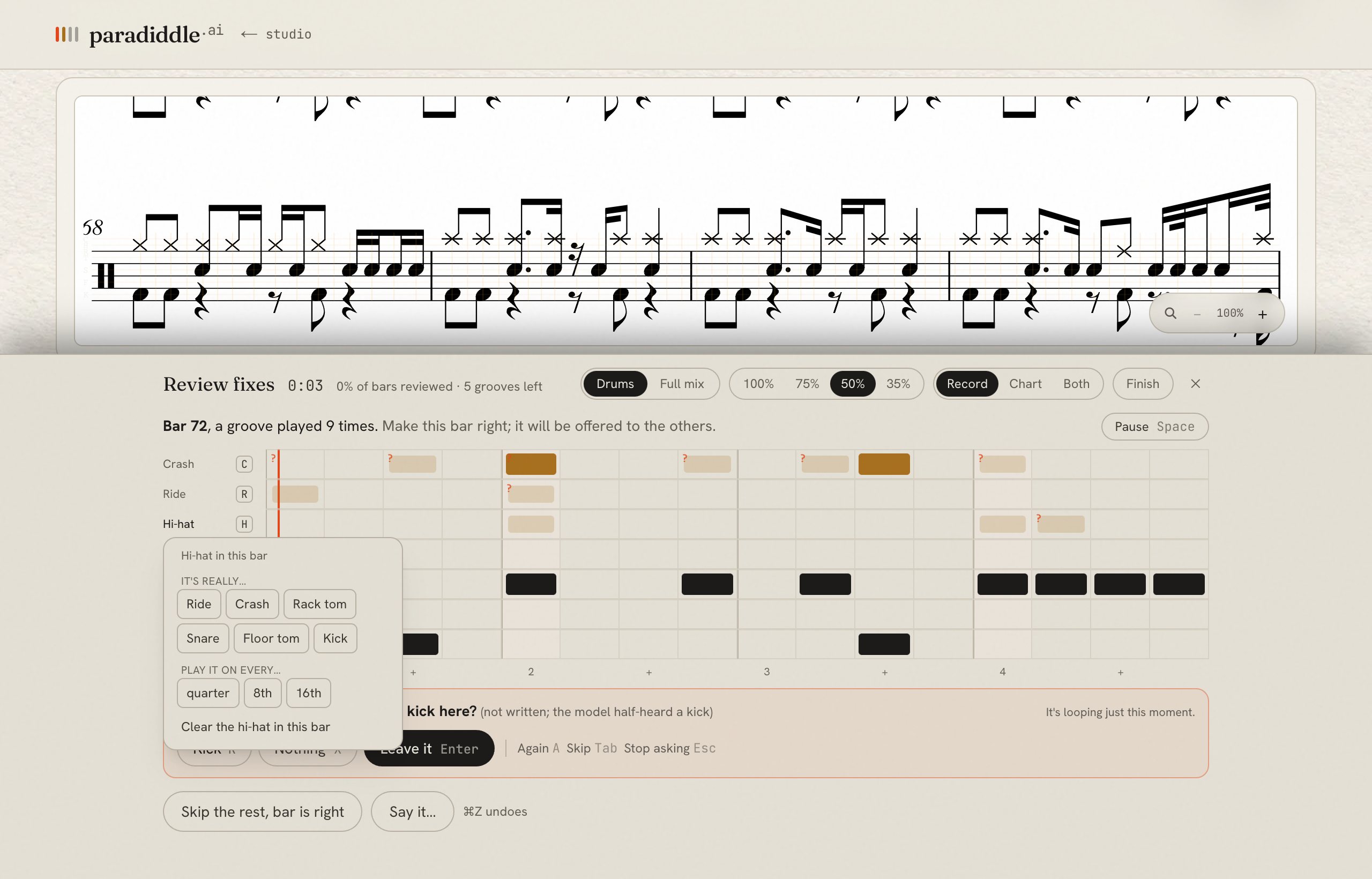
Not sure? Record plays the song, Chart plays what's written on a synth kit, and Both plays one over the other.
- 4
Press This bar is right (Enter)
- 5
Check one more bar by ear
It plays another bar from the same groove: Does bar 12 sound like this? Yes, apply to N bars (Enter) copies your fix to every bar played the same, as one undo. No, it's different (N) lets you fix that bar too, and the group splits by sound.
- 6
Change all the hits like the ones you fixed
After you make the same change three times (say, hi-hat to ride), it finds the other hits that sound like those. Press Hear 1 and Hear 2; if both should change, Change all.
- 7
Press Finish when the chart is one you'd sign off
You can stop at any time; everything you did stays. Then press Save.
⌘Z undoes the last change, even one that went to twenty bars at once. ⇧⌘Z redoes it. Space pauses the loop.
Edit any bar
Change any bar, or many bars at once, whether or not the review points at it.
- 1
Click a bar on the score
Pause first: while it plays, a click jumps the playback instead. A strip appears at the bottom of the score, just above the player: Bar 23 · edit this bar… · select more bars.
- 2
One bar: edit this bar…
If your click landed on a note, the note's own bar appears instead: choose edit bar… there.
- 3
Several bars: select more bars, click the last bar, then edit these bars…
The arrow keys add whole bars too. The selected bars are shaded on the score.

With bars selected, quick changes work without opening the grid: change…, hats → ride, swap toms, crash on 1s, type it, clear. - 4
Make the change
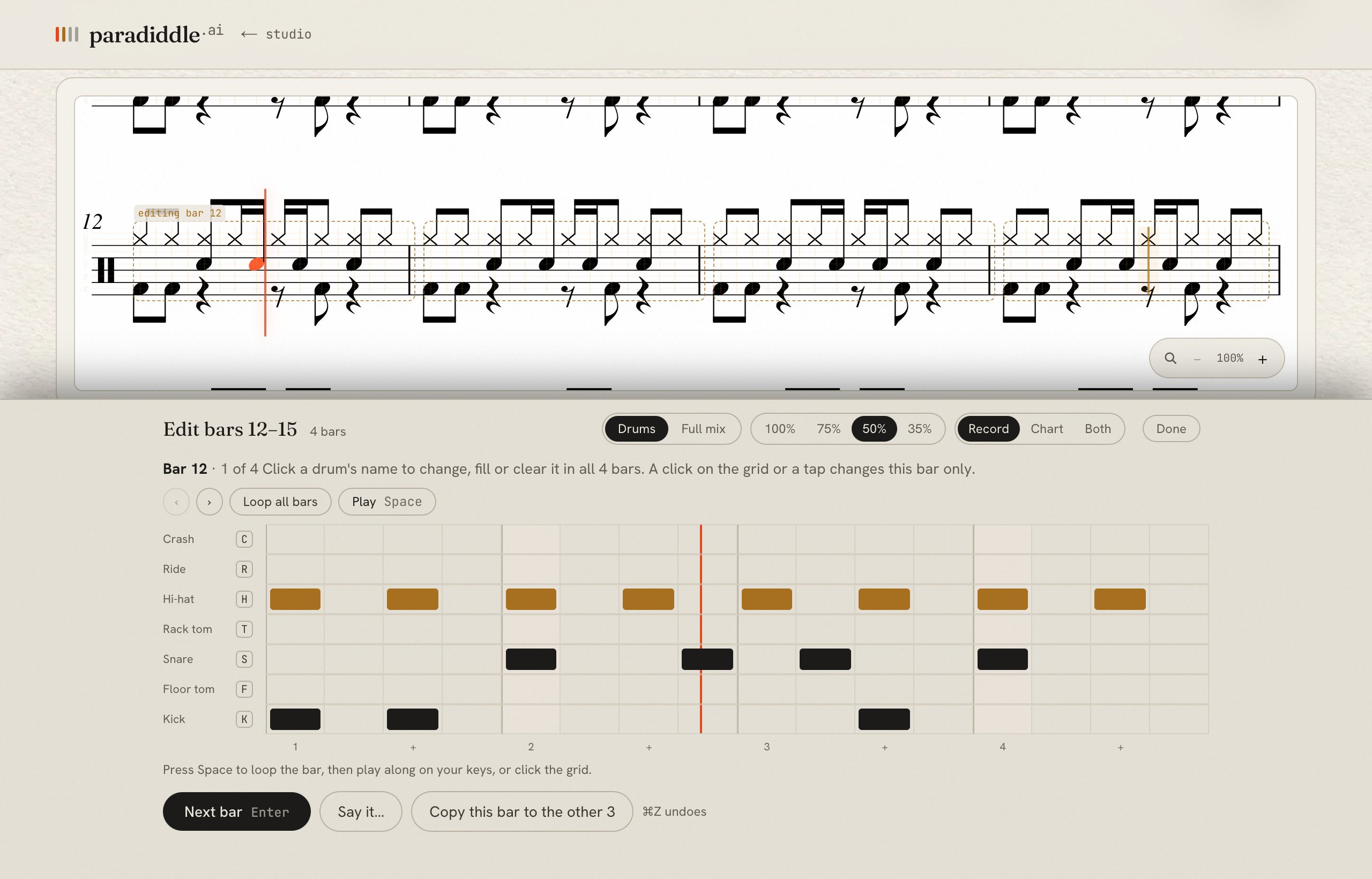
The grid shows one bar at a time. A change made from a drum's name (It's really…, Play it on every…, Clear) goes to every bar you picked. A click on the grid or a tap changes only the bar on screen.
- Copy this bar to the other N makes every picked bar the same as this one.
- ‹ › or Next bar (Enter) move through the bars; Loop all bars plays the whole selection.
- Say it… for all of them: “the hats are a ride”, “crash on every 1”.
- Check N spots the model was unsure of asks its questions for this bar.
- 5
Press Done
Tell Paradiddle what's wrong
Describe the problem the way you'd tell another drummer. It changes only what you ask.
- 1
Type in the box under the chart's title, or press the microphone and say it
- “Hi-hats are missing in bars 17 to 22”
- “The ride in the chorus should be crash”
- “The toms in the fill are the wrong way round”
- “Make bar 12 the same as bar 11”
With bars selected, it works on those bars.
- 2
Press Fix it
It reads the chart and what the model heard, makes the change and says what it did. If your words could mean two things, it asks first.
- 3
Check the suggestions
Changes it's sure of go straight onto the chart. The ones it isn't sure of (a hit it only heard faintly, or one copied from the pattern) come back as suggestions: hear each spot, then keep it or skip it.
- 4
Keep the result, or ⌘Z to undo it
Each song has a set number of requests, and there's a daily limit.

Fix single notes
For one-off fixes, the keyboard is fastest.
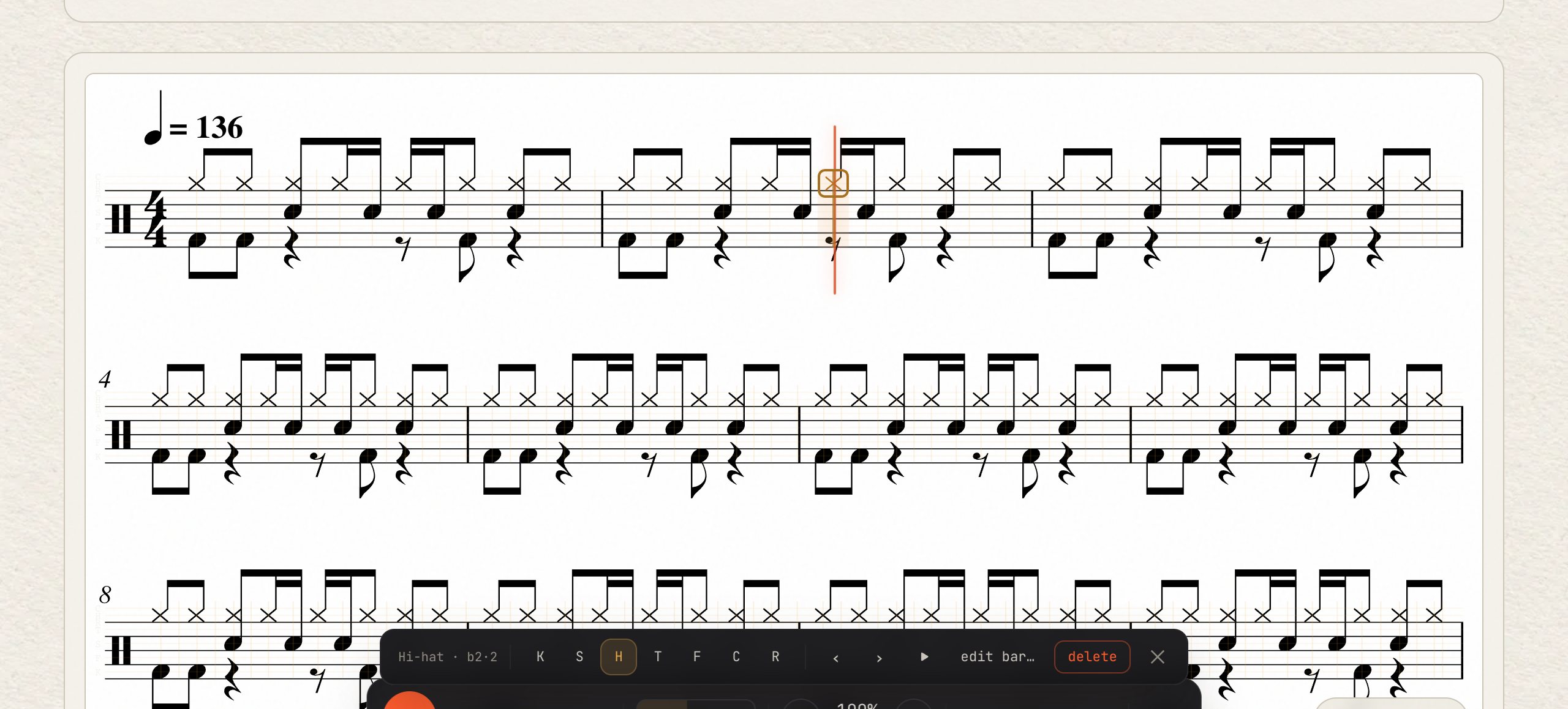
- Click the score to put the cursor there (the highlighted sixteenth). ← → move a sixteenth, ↑ ↓ a bar.
- K S H T F C R add or remove that drum at the cursor.
- Click a note to select it. The bar that appears changes it to another drum, deletes it (⌫), nudges it earlier or later (, .) or plays from there.
- E types a whole bar in drum tab:
H x-x-x-x- S --o---o- K o---o---. - ⇧R records: play along and tap the drum keys in time.
- After you fix a bar, Paradiddle may offer Same pattern as bar N in M more bars: Fix them all.
Save, export and share
- 1
Press Save N fixes (⌘S)
Your fixes stay in this browser tab until you save. Saving re-engraves the chart with them, so exports and other devices get the fixed chart.
- 2
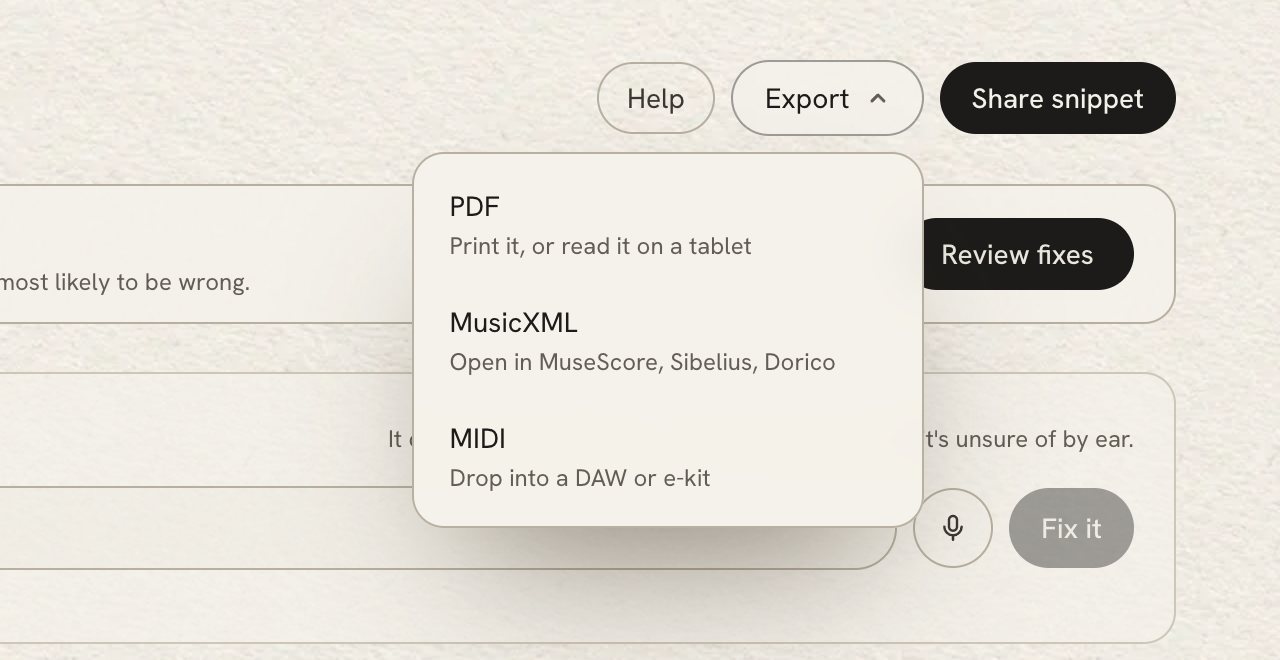
Press Export and pick a format
- PDF: print it, or read it on a tablet.
- MusicXML: open it in MuseScore, Sibelius or Dorico.
- MIDI: drop it into a DAW or an e-kit.
- 3
Share snippet makes a short video of the chart scrolling with the music
Pick the bars, choose a title and a notation card, confirm you own the recording or have permission to share it, and render.
On a phone
Charts play and edit on a phone too.
- Tap a note to change or delete it.
- The drum chips under the score add or remove a drum at the cursor; ‹ › move it.
- Edit bar, Select bars, Type bar and Record sit in the row above the player.
- Review fixes works best on a computer: its fastest answers are keys.
Keyboard shortcuts
Press ? on any chart to see these.
Move around
- ← / →
- A 16th at a time
- ↑ / ↓
- A bar
- ⇧↑ / ⇧↓
- A line
- Home / End
- Start / end of the chart
- Tab / ⇧Tab
- Next / previous flagged note
- Space
- Play from the cursor
Edit drums
- K S H T F C R
- Add / remove kick · snare · hi-hat · tom · floor tom · crash · ride at the cursor
- , / .
- Nudge a 16th earlier / later (also ⇧← ⇧→)
- D · Delete · ⌫
- Clear the slot (or delete the selected note)
- 1–7
- Change a selected note → KD SN HH TT FT CY RD
- Enter
- Apply the suggested fix
Fix many notes at once
- V
- Select bars from the cursor's bar · ← → ↓ ↑ add whole bars · V again sets it
- ⌘A
- Select every bar · dragging on the staff selects too
- H then R
- In the selection: every hi-hat → ride (any two letters)
- T then ⇧F
- Swap two drums (rack ⇄ floor tom)
- ] / [
- Toms down / up a drum (selection, else this bar)
- A then C
- Crash on every downbeat of the selection
- H then ⌫ · ⌫
- Delete every hi-hat · clear the selection
- ⌘C / ⌘V
- Copy bars · paste them at the cursor's bar
- P · ⇧P
- Repeat your last bar fix on every bar with the same pattern · loose match
Type or play it in
- E
- Type this bar: H x-x-x-x- S --o---o- K o---o--- (Enter = next bar)
- ⇧R
- Record: play along and tap K S H T F C R in time (⇧R / Space stops)
Review panel
- ↑ / ↓
- Previous / next card
- Enter
- Apply the active card
- X
- Dismiss the active card
- E
- Show / hide all flags
- ⇧A
- Apply all suggestions
Session
- ⌘Z / ⇧⌘Z
- Undo / redo
- ⌘S
- Save fixes (re-engraves the chart)
- Esc
- Close / deselect
- ?
- This overlay
Review fixes and Edit bars
- K S H T F C R
- Answer a question, or tap that drum in time
- X
- Nothing is there
- Enter
- Right as written · this bar is right · yes, apply
- A · Tab · Esc
- Again · skip the question · stop asking
- N
- No, this bar is different
- − / =
- Slower / faster
- Space
- Pause / resume the loop
Account, songs and billing
- Your first song is free. Then buy one song ($3) or a pack, or go unlimited with Pro ($12 a month). See pricing.
- The number at the top of the studio is how many songs you have left. A failed transcription gives its song back.
- Account & billing is in the menu under your picture: buy more songs, and open receipts and the card on file.
- Help improve Paradiddle (also on that page) decides whether your fixes can be used to train the model. Turning it off doesn't change your charts.
- To delete a song, use the bin next to it in your studio. To delete your whole account, email us from your account's address.
Troubleshooting
The YouTube link didn't work.
Some videos can't be fetched. Download or export the song as an mp3, wav, m4a or flac and use Upload audio instead; uploads are the reliable path. A failed transcription gives your song back.
The bar lines are in the wrong place, or the tempo is off.
Paradiddle finds the beat from the recording. Songs with a free intro, a tempo change or a lot of rubato are the hardest. Play the first bars with the cursor running: if the cursor follows the music but a bar starts on the wrong beat, the notes are still right and only the bar lines are shifted. Tell us at hello@paradiddle.ai with the song and the bar, and we'll look at it.
It wrote hi-hat where the drummer plays ride (or the other way round).
This is the most common mistake, and the quickest to fix. Select the bars (click the first bar, select more bars, click the last one), then hats → ride. Or say it: “the hats in the chorus should be ride”.
Why is there only one cymbal where the drummer hit two?
When the model hears two cymbals on the same hit it is usually one cymbal heard twice, so the chart keeps one (the crash, if one of them is a crash). If the drummer really did hit both, add the other: click the hit's bar, edit this bar…, and click the cell.
Does it handle double kick?
Yes. Fast double-bass runs come out as sixteenth notes. In very dense metal, the rest of the kit around the feet needs more checking.
My fixes disappeared.
Fixes stay in the browser tab until you press Save. If you closed the tab or opened the chart somewhere else before saving, they were not kept. Save as you go: ⌘S or the Save button at the top.
The playback sounds wrong or has no drums.
drums plays the drum track Paradiddle separated from the song; mix plays the whole song. In Review fixes, Chart plays what's written on a synth kit instead of the recording, so you can compare.
How accurate is it?
Accuracy depends on the song and the drum. Kick and snare are usually right; cymbals and toms need the most checking. See accuracy for the numbers we've measured.
Still stuck? Email hello@paradiddle.ai. Tell us the song and the bar, and we'll take a look.